The Problem with Traditional Web Map Tools
Most enterprise web mapping tools were built on an early 2000s assumption: that a backend server must handle every interaction. Every zoom, every filter, every click triggers a round-trip to the server, waits for processing, and returns the result.
This design introduces seconds of lag and is why maps in most BI tools feel slow or are limited to showing a few hundred points or high-level aggregations. These limitations frustrate users and block insights.
It also means costs scale with usage. More users means more server load, more warehouse queries, and more compute spend.

Our Approach: Processing at the Edge
Honeycomb takes a fundamentally different approach. Using WebAssembly and a custom implementation of a state-of-the-art columnar data engine, we move data processing directly into the browser.
When you interact with a Honeycomb map, there's no server in the loop. Aggregations, filters, and renders happen locally, on your device, in under 80 milliseconds. The experience is buttery-smooth: zoom into an H3 layer, draw a custom region, or scrub through a timeline - the map responds instantly.
Parts of this technology are patent-pending.
Why This Matters
Speed without infrastructure. No map backend to deploy, scale, or secure. Your laptop's CPU and GPU do the work.
Scale without cost explosion. Each user brings their own compute capacity. Roll out to hundreds or thousands of users without multiplying your warehouse spend.
Security by design. Data is fetched once, then processed locally. It never passes through a third-party server or leaves your security perimeter.
Deeply Integrated with Snowflake
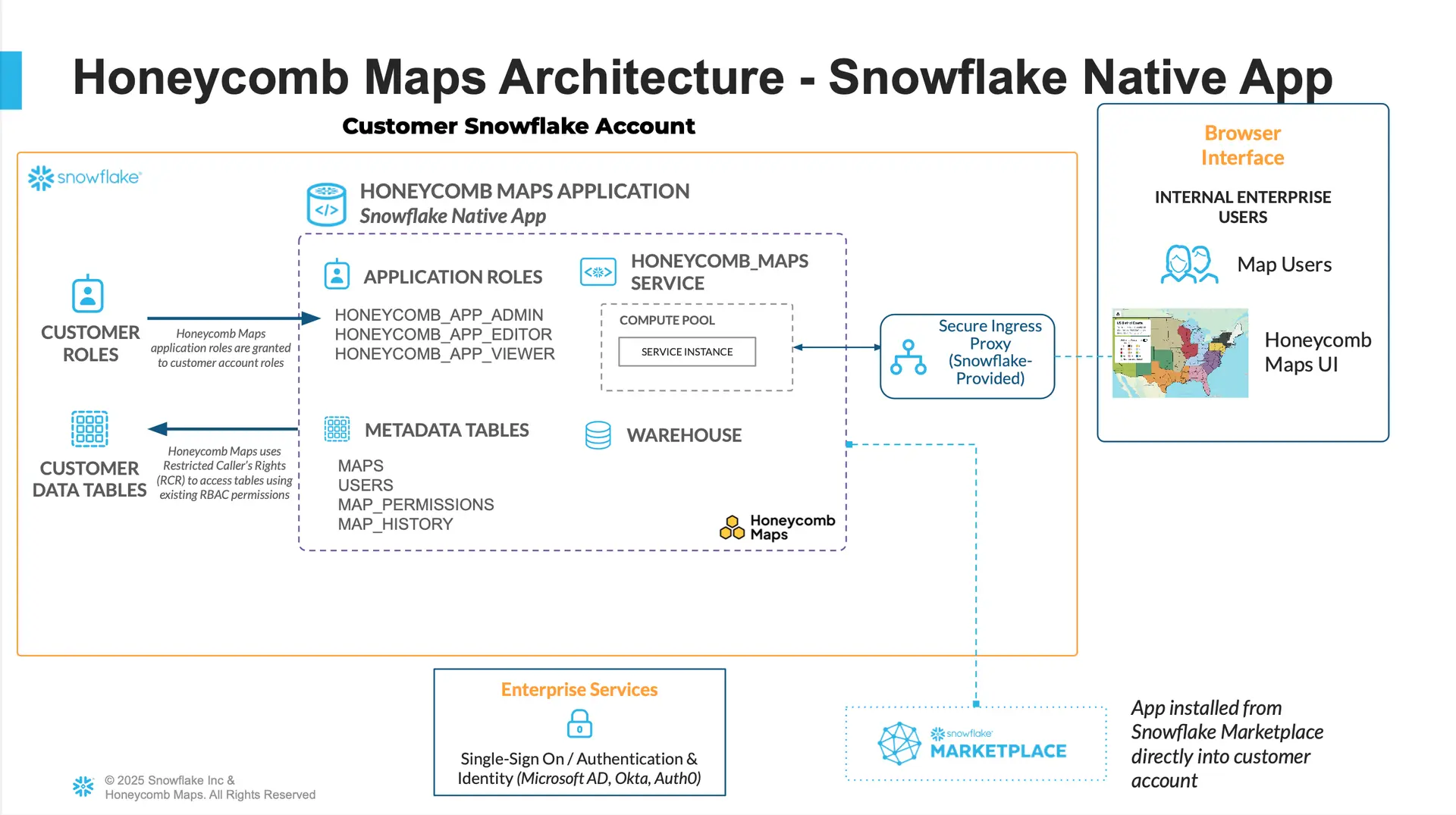
Honeycomb is deployed as a Snowflake Native App, running directly inside your Snowflake environment. This is a true integration rather than basic a database connection:
- Direct table access: Query your existing Snowflake tables with no ETL, no tile generation, no preprocessing
- Inherited permissions: We use Snowflake's restricted caller's rights, so your existing access controls apply automatically in Honeycomb
- Minimal warehouse impact: Data loads once; all subsequent interaction happens in the browser
Snowflake handles storage, governance, and security. Honeycomb handles visualization. You get modern, high-performance maps without added infrastructure or complexity.